
WorkFuz
About WorkFuz
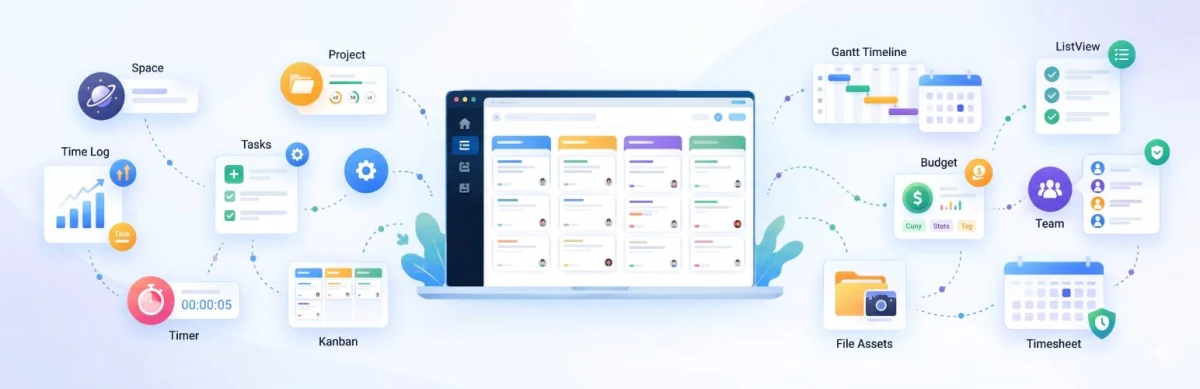
WorkFuz is a modern, high-performance project management plugin engineered specifically for WordPress. Built for creative agencies, software teams, freelancers, and enterprise client portals, WorkFuz replaces bloated, slow external project tools with a secure, native WordPress solution that lives directly inside your own server.
Unlike conventional plugins that clutter the database with heavy custom post types and slow postmeta queries, WorkFuz is powered by a dedicated, high-speed relational database architecture optimized for instant loading, real-time collaboration, and multi-tenant project segmentation.
Key Features & Architecture
Discover what makes WorkFuz unique, reliable, and developer-friendly.
Centralized Global Configuration & Workflow Rules
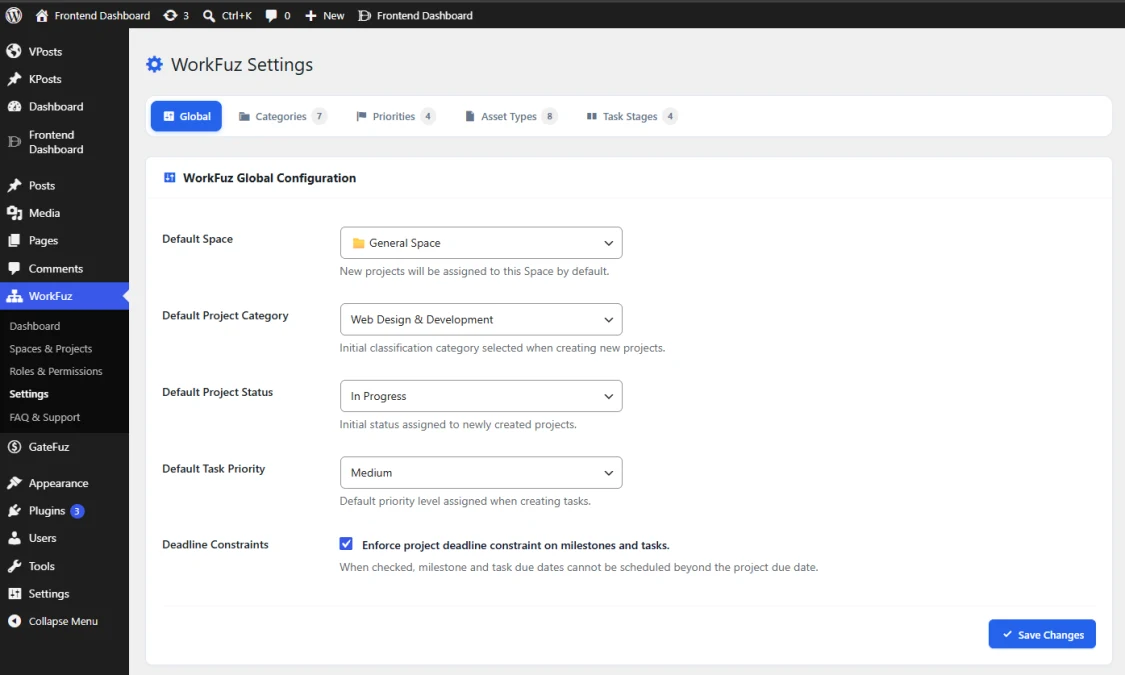
Fine-tune how your project management engine operates with the sleek WorkFuz Settings center. Standardize organization defaults across Spaces, Categories, Priorities, Asset Types, and Task Stages, while enforcing strict project-scheduling constraints across all team members.
- Sleek Single-Line Subtabs Navigation: Intuitive tabbed management with badge counters for Global, Categories (7), Priorities (4), Asset Types (8), and Task Stages (4).
- Smart Organizational Defaults: Pre-assign default Spaces, Project Categories, Initial Project Statuses, and Task Priorities to speed up new project creation.
- Strict Deadline Constraints Engine: Intelligent scheduling guard prevents milestones and tasks from ever being scheduled beyond the parent project's due date, keeping delivery roadmaps coherent.
- Fully Customizable Taxonomies: Create, color-code, and re-order custom project categories, priority levels, and file asset types with custom color pickers.
- Addon Extensibility: Architecture hooks allow add-ons (like WorkFuz Pro) to cleanly inject dedicated settings tabs without touching core files.
Granular Role-Based Permissions & Access Matrix
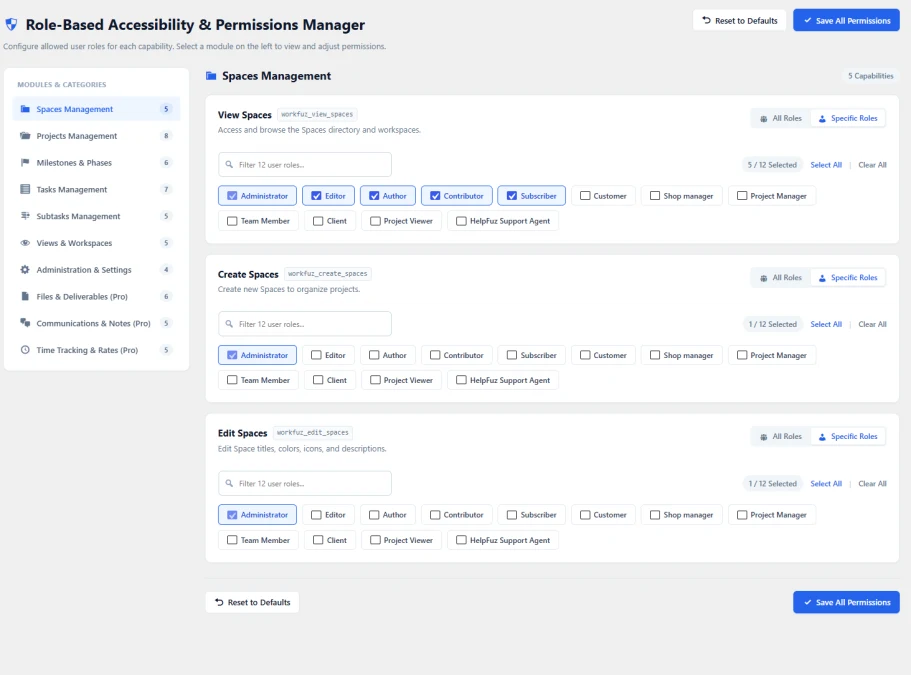
WorkFuz features a robust, enterprise-grade Role-Based Accessibility & Permissions Manager. Tailor exact access privileges across all standard and custom WordPress roles (such as Administrator, Editor, Project Manager, Client, and Team Member), ensuring clients only see their own deliverables while staff maintain full administrative control.
- Modular Capability Segmentation: Granular permissions organized across 10 functional modules: Spaces, Projects, Milestones, Tasks, Subtasks, Views, Admin Settings, Deliverables, Notes, and Time Tracking.
- Multi-Role Selector Matrix: Toggle capabilities globally across All Roles or configure Specific Roles per action.
- Integrated Role Filter: Fast live search to quickly filter through dozens of roles and configure permissions with 1-click Select All / Clear All.
- Developer Capability Hooks: Each capability is mapped directly to standard WordPress capability strings (e.g.
workfuz_view_spaces,workfuz_create_spaces,workfuz_edit_spaces) for seamless custom code checks. - Fail-Safe Management: Includes 1-click Reset to Defaults and persistent storage to prevent accidental role lockouts.
High-Density Tabular Project Registry (List View)
The Executive Telemetry Dashboard provides team leaders, agency executives, and project managers with a unified, real-time command center. Eliminate status-meeting overhead with instant visibility into project health, completion velocity, budget allocations, and delivery timelines across your entire organization or filtered by individual client spaces.
- High-Impact Metric Cards: Monitor total Spaces, active Projects Portfolio, real-time Task Velocity (%), total Budgets & Logged Hours, and overall Deadline Health in a single glance.
- Dynamic Telemetry Scope: Filter all analytics and pipeline charts dynamically between All Spaces (Global) or isolate a specific client partition.
- Interactive Pipeline & Priority Radar: Real-time visual progress bars breaking down task statuses (To Do, In Progress, Completed) alongside workload distribution weighted by priority (Urgent, High, Medium, Low).
- Upcoming Milestones & Deadlines Radar: Chronological radar showing approaching delivery milestones with remaining countdown badges (e.g. In 8 days, In 22 days).
- Direct Workspace Shortcuts: One-click navigation to jump straight from high-level portfolio telemetry into any specific project workspace.
Multi-Tenant Spaces & Card Portfolio View
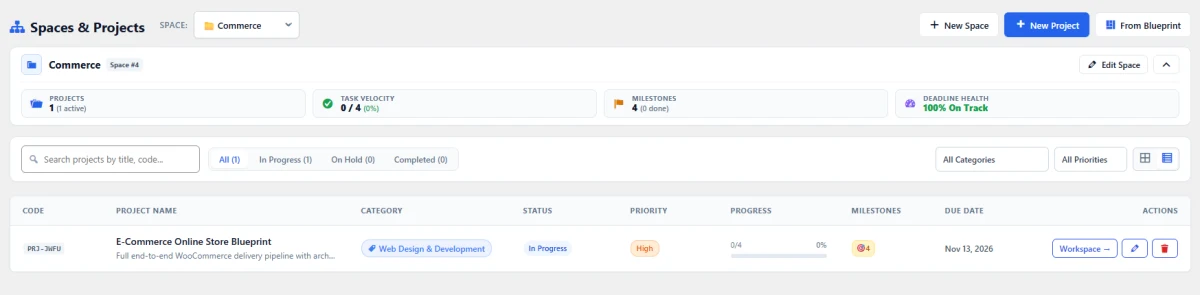
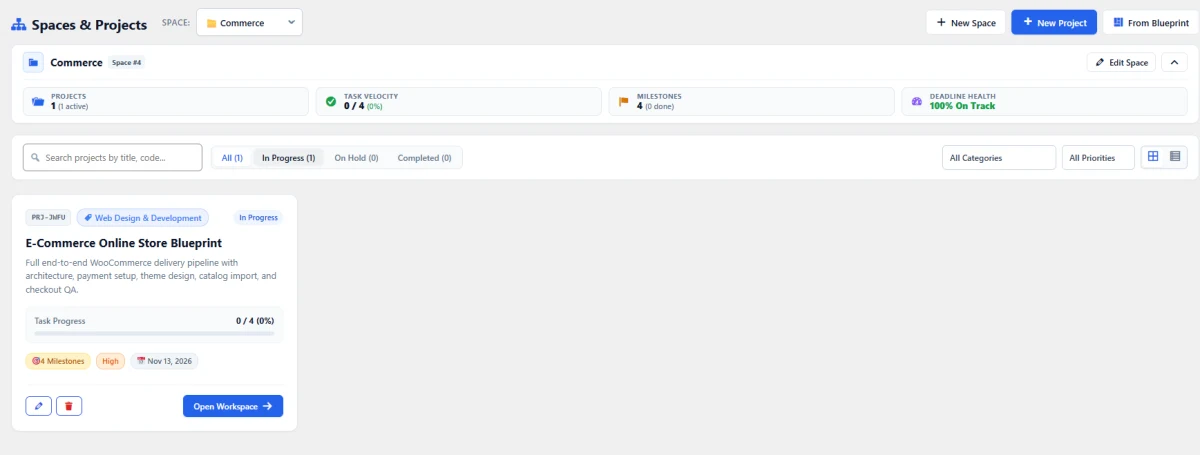
Organize projects cleanly without clutter using WorkFuz's Multi-Tenant Spaces Architecture. Segment initiatives by Client Organization (e.g., Commerce, Finance) or internal departments. The responsive card view delivers visual project cards packed with essential telemetry, milestone badges, and quick-action toolbars.
- Multi-Tenant Space Isolation: Dedicated switcher to partition and focus exclusively on one client or department at a time.
- Space Header Telemetry: Compact rollup bar summarizing total projects, task completion velocity, milestone counts, and deadline compliance within the active space.
- Visual Project Cards: Rich metadata cards showing project codes (e.g.
PRJ-JMFU), category pills, status indicators, and completion progress bars. - Fast Filter & Search Toolbar: Instant live search by title or project code, with quick filters for status (All, In Progress, On Hold, Completed), category, and priority.
- One-Click Workspace Access: Dedicated button to instantly launch the project workspace, plus quick edit and delete controls.
Executive Telemetry & Performance Dashboard
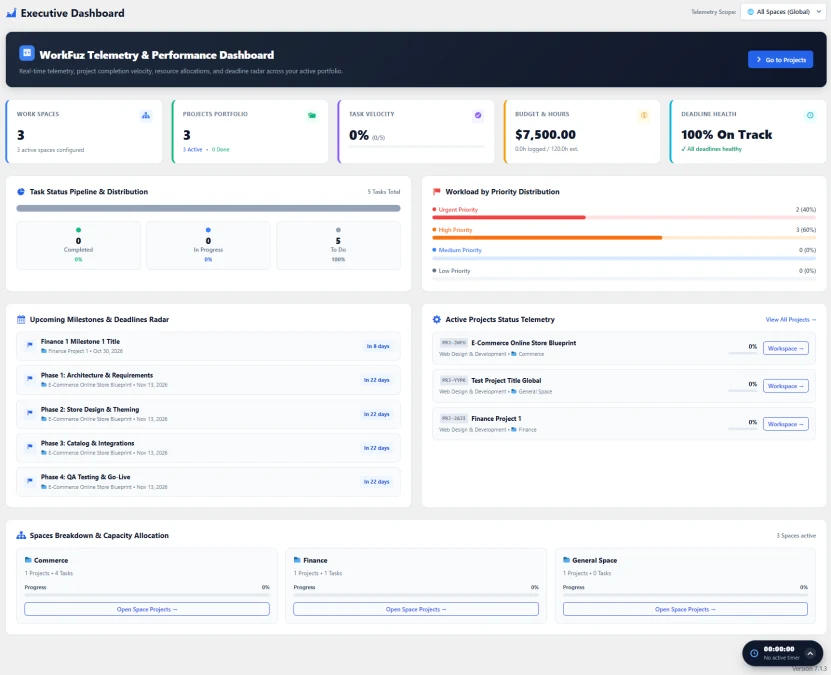
The Executive Telemetry Dashboard provides team leaders, agency executives, and project managers with a unified, real-time command center. Eliminate status-meeting overhead with instant visibility into project health, completion velocity, budget allocations, and delivery timelines across your entire organization or filtered by individual client spaces.
- High-Impact Metric Cards: Monitor total Spaces, active Projects Portfolio, real-time Task Velocity (%), total Budgets & Logged Hours, and overall Deadline Health in a single glance.
- Dynamic Telemetry Scope: Filter all analytics and pipeline charts dynamically between All Spaces (Global) or isolate a specific client partition.
- Interactive Pipeline & Priority Radar: Real-time visual progress bars breaking down task statuses (To Do, In Progress, Completed) alongside workload distribution weighted by priority (Urgent, High, Medium, Low).
- Upcoming Milestones & Deadlines Radar: Chronological radar showing approaching delivery milestones with remaining countdown badges (e.g. In 8 days, In 22 days).
- Direct Workspace Shortcuts: One-click navigation to jump straight from high-level portfolio telemetry into any specific project workspace.
Changelog & Release Notes
Transparent release cycle, continuous improvements, and detailed developer logs for WorkFuz.
Changelog & Release Notes
Real-Time Releases
Instant updates, hotfixes & continuous delivery.
Developer Notes
Inspect migration guides, hooks & API changes.
Roadmap Sync
Transparent milestones and upcoming features.
Frequently Asked Questions & Knowledge Base
We host a comprehensive, searchable documentation portal with tutorials, troubleshooting guides, and answers to all common questions for WorkFuz.
Instant Search
Search through categorized articles, setup guides, and FAQs.
Guides & Code
Copy-paste PHP snippets, block usage, and shortcode examples.
Direct Support
Get detailed troubleshooting and step-by-step assistance.
License Checkout
WorkFuz