
Frontend Dashboard Pay Per Post

About Frontend Dashboard Pay Per Post
Frontend Dashboard Pay Per Post is a monetization and editorial management extension engineered specifically for the Frontend Dashboard ecosystem. It bridges front-of-house content creation with automated payment collection, credit balance accounting, and listing lifecycle management.
Whether you run a guest blogging marketplace, sponsored review platform, job board, classified ads site, or client publishing portal, Pay Per Post provides an end-to-end workflow:
- Monetize Submissions Upfront: Require authors and advertisers to pay per post before submission.
- Sell Priority Featured Add-ons: Upsell featured listing badges that give top placement and enhanced visibility to high-value content.
- Sell Volume Packages & Prepaid Credits: Offer 5-, 10-, or 20-post bundles so repeat authors can purchase credits at volume discounts and draw them down over time.
- Automate Listing Lifecycles & Renewals: Set custom listing durations (e.g., 30, 60, or 90 days) with automatic expiration to draft mode and one-click renewals.
- Dedicated Contributor Hub ("My Submissions"): Authors manage their own credit allowances, track review statuses, edit drafts, download payment receipts, and repurchase packages directly on the frontend.
Unified Payments with GateFuz
Pay Per Post integrates natively with GateFuz, BufferCode’s payment gateway engine (supporting Stripe, PayPal, Razorpay, Authorize.Net, and offline/bank transfers). With cryptographic server-side validation and automated receipt generation, every transaction is secure and traceable.
Flexible Plans for Every Stage
Simple, transparent licensing with no hidden fees. Upgrade or renew anytime directly from your dashboard.
Starter
Renews at $29/yr (Locked Discount)
- 1 Website License
- 1 Year Updates & Support
Business
Renews at $99/yr (Locked Discount)
- 5 Websites License
- Priority Support
- All Pro Features Included
Agency
Renews at $299/yr (Locked Discount)
- 25 Websites License
- VIP Priority Support
- Multi-Client Deployment
Key Features & Architecture
Discover what makes Frontend Dashboard Pay Per Post unique, reliable, and developer-friendly.
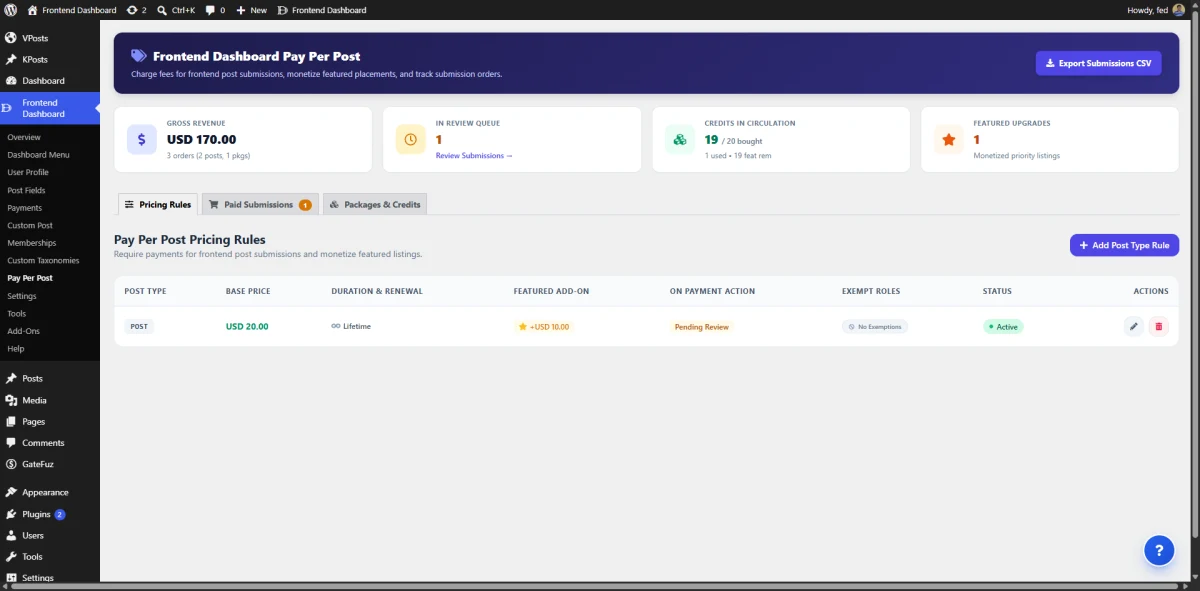
Real-Time Revenue & Operational Intelligence Dashboard
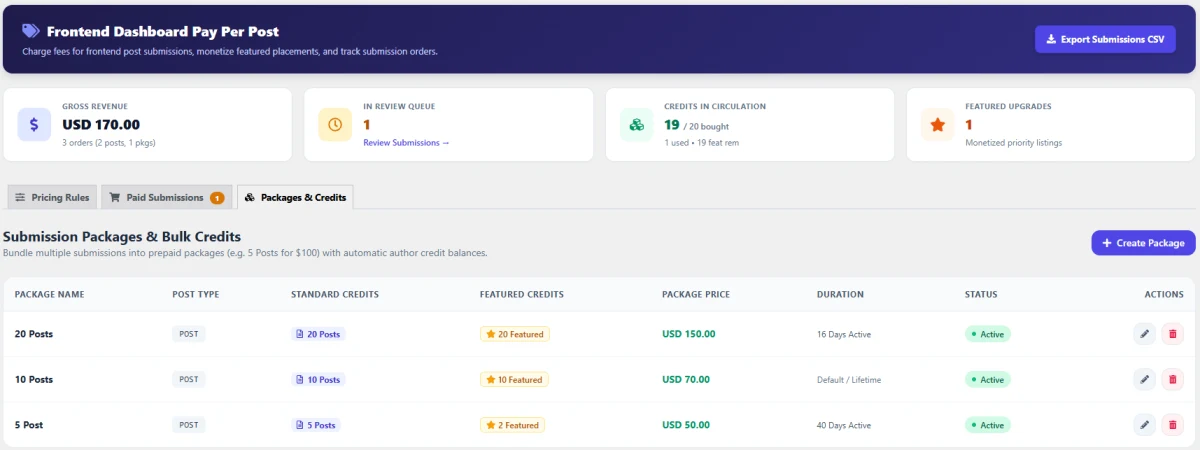
Track revenue performance, editorial workload, and liability credits in real time with high-visibility KPI metric cards at the top of the admin console.
- Gross Revenue Tracker: Real-time sales total with breakdown of single-post orders versus prepaid package purchases.
- In-Review Queue Counter: Instant tally of pending submissions awaiting administrator action with direct shortcut links.
- Credits in Circulation: Live ledger tracking of purchased credits vs. used credits, helping administrators track outstanding author obligations.
- Featured Upgrades Metric: Monitor adoption rates of priority listing add-ons to evaluate upsell performance.
The Author Contributor Hub ("My Submissions")
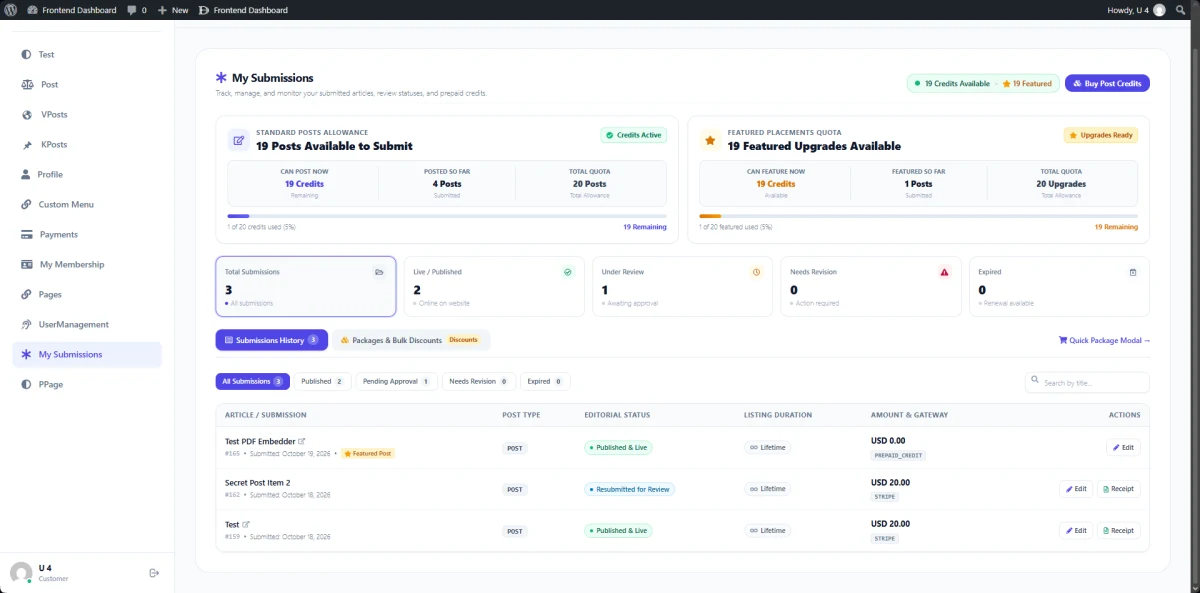
Authors enjoy a modern, self-service dashboard embedded directly within Frontend Dashboard. Contributors can track article review progress, monitor prepaid credit consumption, inspect payment methods, view transaction receipts, and purchase new credit bundles without administrative intervention.
- Standard Post Allowance Card: Live counter displaying
Posts Available to Submit, total allowance quota, and a visual progress bar (e.g.,1 of 20 credits used (5%) • 19 Remaining). - Featured Placements Quota Card: Displays remaining featured upgrade credits and usage history (
1 of 20 featured used • 19 Remaining). - Submission Status KPI Badges: Quick overview cards tracking
Total Submissions,Live / Published,Under Review,Needs Revision, andExpired. - Instant Credit Purchases: A dedicated
Buy Post CreditsCTA andQuick Package Modallet authors top up their balance in seconds. - Detailed Submissions History Table:
- Tracks article title, submission date, post type badge, and featured status (
⭐ Featured Post). - Displays real-time editorial status (
Published & Live,Resubmitted for Review,Under Review). - Shows listing duration (
Lifetime/ expiration countdown). - Shows payment breakdown (
USD 0.00viaPREPAID_CREDITorUSD 20.00viaSTRIPE). - Action buttons to Edit content or download official Receipts.
Centralized Paid Submissions Queue & Editorial Workflow
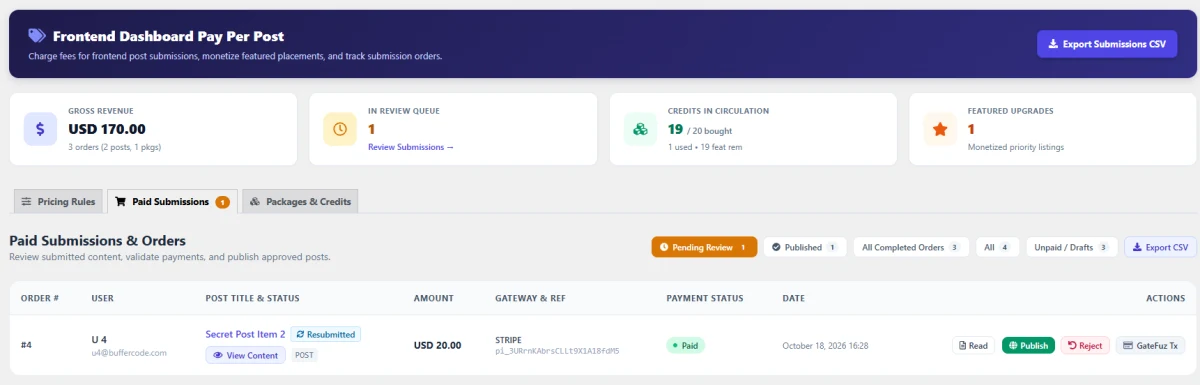
Review paid submissions, inspect content, verify transaction proofs, and publish approved articles from a consolidated order management queue. Authors receive live status updates directly within their frontend canvas.
- Dynamic Status Segmentation: Filter submissions by status badges:
Pending Review,Published,All Completed Orders,All, andUnpaid / Drafts. - Order & Transaction Traceability: View customer email, paid amount, payment gateway reference (e.g., Stripe Payment Intent ID), and timestamp in one glance.
- 1-Click Editorial Actions:
- Read / View Content: Preview submitted post text, images, and custom fields directly.
- Publish: Approve and publish the post to your site in real time.
- Reject with Feedback: Provide clear rejection reasons so authors can revise and resubmit.
- GateFuz Tx Inspection: Open linked GateFuz transaction records for billing audits and receipt generation.
- Resubmission Tracking: Visual
Resubmittedbadges highlight articles revised by authors for secondary review.
Bulk Submission Packages & Prepaid Author Credits
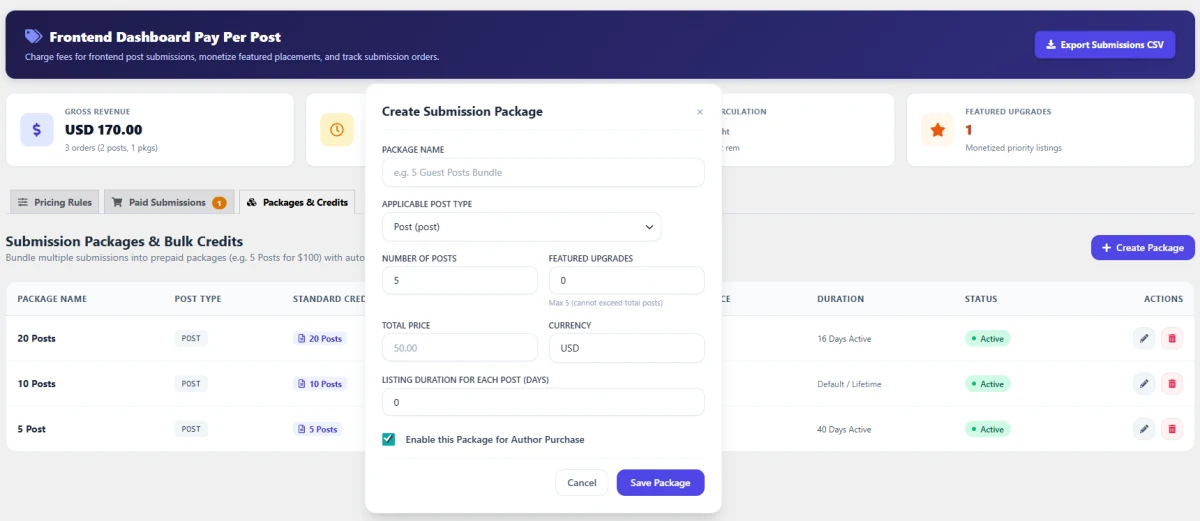
Instead of paying per individual submission, frequent contributors and PR agencies can buy prepaid packages and draw down credits over time. The plugin manages credit ledgers automatically—deducting standard and featured credits upon submission.
- Flexible Package Configurations: Create custom packages with custom pricing (e.g., 5 Posts for $50, 10 Posts for $70, 20 Posts for $150).
- Proportional Featured Upgrades: Allocate bundled featured credits alongside standard posts with strict validation safeguards (featured credits cannot exceed total post count).
- Per-Package Active Lifespans: Set package validity periods (e.g., 40 days active, 16 days active, or lifetime/unlimited).
- Automated Author Balance Ledger: Contributor dashboards dynamically show available standard credits and featured balances during creation and checkout.
- Package Status Toggle: Instantly activate or pause packages from author purchase with one click.
Granular Per-Post-Type Pricing Rules & Expiration Management
Every post type on your site can have its own independent pricing strategy, duration, and editorial routing. From standard blog articles to custom listings, you maintain complete control over pricing and access permissions.
- Custom Post Type Support: Target standard WordPress
postor any registered Custom Post Type (e.g., listings, events, jobs). - Listing Lifetimes & Renewal Terms: Choose between permanent lifetime listings (
0) or time-limited durations (e.g., 30 days). Define renewal prices to charge authors recurring fees to keep their content active. - Automated Expiration Handling: Automatically revert expired content to Draft mode (
Revert to Draft (Offline & Renewable)) so listings leave the public site until renewed. - Monetized Featured Add-ons: Upsell an optional priority boost at checkout (e.g., +$10.00) with independent featured duration rules.
- Post-Payment Editorial Routing: Send newly paid posts straight to
Pending Reviewfor editorial inspection or auto-publish immediately upon payment confirmation. - Role-Based Exemptions: Exempt specific user roles (e.g., Administrators, Editors, or VIP Staff) from payment with one-click role filters.
Release Notes & Version History
Transparent release cycle, continuous improvements, and detailed developer logs for Frontend Dashboard Pay Per Post.
Release Notes & Version History
Follow every update, improvement, and new release for Our Plugin. View comprehensive release notes, upcoming roadmap features, and detailed developer logs on our dedicated changelog hub.
Real-Time Releases
Instant updates, hotfixes & continuous delivery.
Developer Notes
Inspect migration guides, hooks & API changes.
Roadmap Sync
Transparent milestones and upcoming features.
Frequently Asked Questions & Knowledge Base
We host a comprehensive, searchable documentation portal with tutorials, troubleshooting guides, and answers to all common questions for Frontend Dashboard Pay Per Post.
Instant Search
Search through categorized articles, setup guides, and FAQs.
Guides & Code
Copy-paste PHP snippets, block usage, and shortcode examples.
Direct Support
Get detailed troubleshooting and step-by-step assistance.
License Checkout
Frontend Dashboard Pay Per Post