
Frontend Dashboard Membership

About Frontend Dashboard Membership
Monetize your portal, lock dashboard tabs, and manage recurring member subscriptions with zero code.
Frontend Dashboard Memberships & Paywalls Pro transforms your WordPress site into a complete, self-service subscription business. Whether you are running a paid client portal, a creator community, a premium SaaS dashboard, or exclusive content vaults, this add-on gives you the tools to create recurring revenue streams, gate any dashboard feature, and manage member lifecycles seamlessly from the frontend.
Unlike generic WordPress membership plugins that take over your entire site structure, Memberships Pro is purpose-built to integrate natively with Frontend Dashboard. You can sell monthly, yearly, or lifetime access tiers, protect individual dashboard menu tabs (e.g., custom post publishers, billing modules, profiles, downloads), and even paywall on-page content with native Gutenberg blocks.
Why Choose Memberships & Paywalls Pro?
- Instant Revenue Activation: Launch multi-tier pricing with Stripe, PayPal, or GateFuz support, collect one-time setup fees, and offer free trials.
- Granular Tab-Level Paywalls: Don't just hide pages—protect specific dashboard tools and menus (including custom post types) based on active subscriber tiers.
- Frictionless Member Experience: Members view their active subscription, renewal dates, and available tier upgrades directly on their frontend dashboard without ever seeing
wp-admin. - Zero Theme Conflicts: Use the visual frontend customizer with 6 one-click themes and live interactive preview to match your branding perfectly.
Flexible Plans for Every Stage
Simple, transparent licensing with no hidden fees. Upgrade or renew anytime directly from your dashboard.
Starter
Renews at $29/yr (Locked Discount)
- 1 Website License
- 1 Year Updates & Support
Business
Renews at $99/yr (Locked Discount)
- 5 Websites License
- Priority Support
- All Pro Features Included
Agency
Renews at $299/yr (Locked Discount)
- 25 Websites License
- VIP Priority Support
- Multi-Client Deployment
Key Features & Architecture
Discover what makes Frontend Dashboard Membership unique, reliable, and developer-friendly.
Protect Any On-Page Content Inside the Native WordPress Block Editor
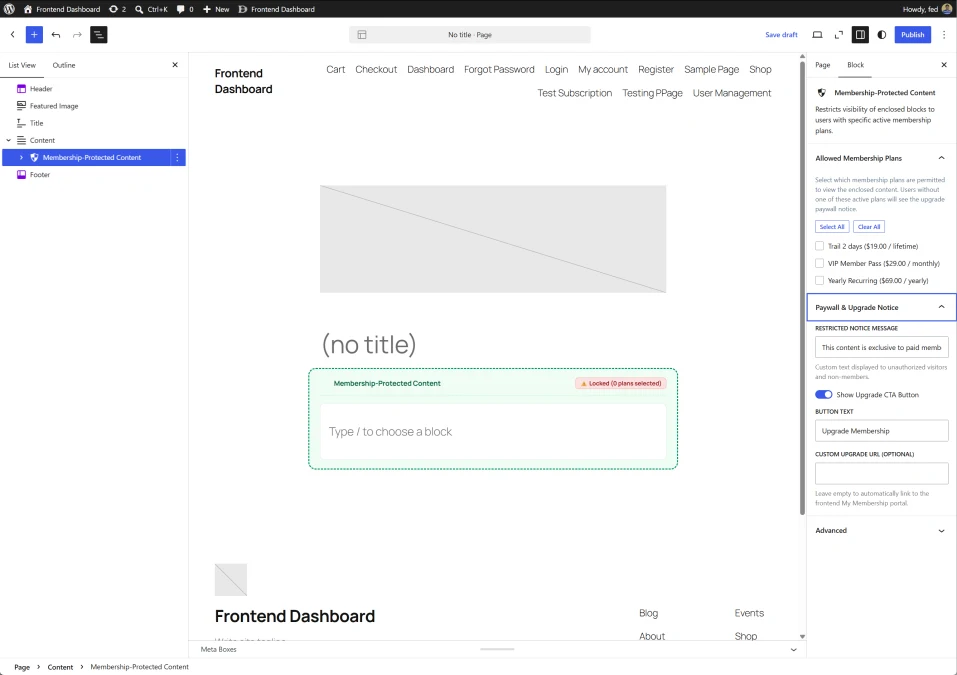
Monetize your blog posts, premium guides, video tutorials, and download links without leaving Gutenberg. The native Membership-Protected Content block allows you to wrap any nested blocks inside a paywall container, displaying custom teaser notices and upgrade buttons to non-subscribers.
- Container Block Flexibility: Nest any block inside the protected container (paragraphs, video players, image galleries, audio, or download buttons).
- Plan-Specific Access Checklist: Select one or multiple allowed membership plans directly from the block inspector panel on the right sidebar.
- Customizable Paywall Teaser: Customize the message non-members see when viewing restricted content (e.g., "This content is exclusive to paid members").
- Built-in Upgrade Call-to-Action: Toggle an Upgrade CTA Button, customize the button label ("Upgrade Membership"), and specify an optional custom redirect URL (or automatically route users to their frontend membership upgrade portal).
- Live In-Editor State Indicators: Shows clear visual flags in Gutenberg ("Locked: X plans selected") so editors always know which sections are gated.
Customize Pricing Cards & Tiers with a Sticky Real-Time Live Preview
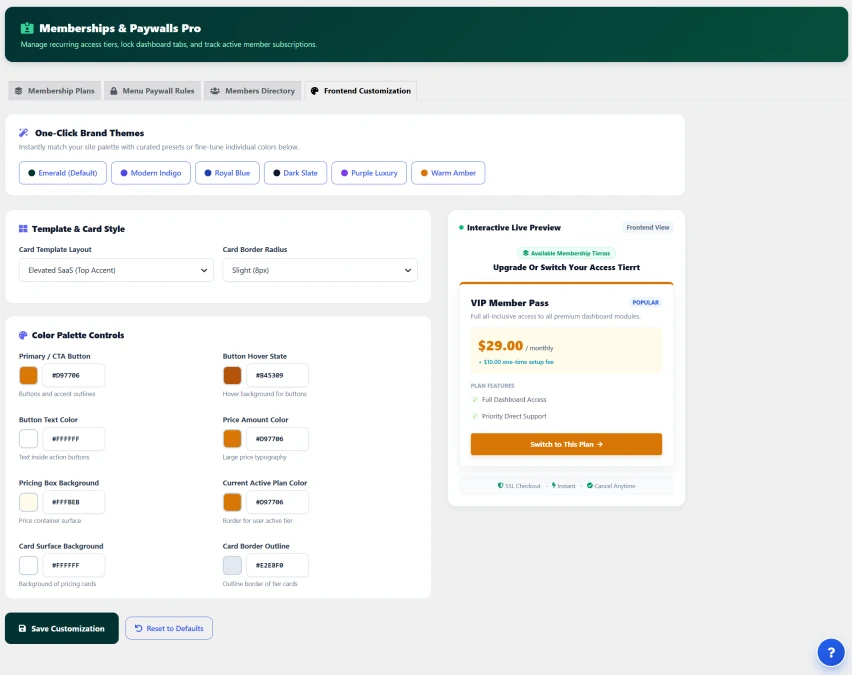
Ensure your membership upgrade cards feel like a natural extension of your website. The Frontend Customization studio lets you tailor colors, card layouts, and button styles with zero CSS coding, while an interactive live preview displays real-time updates as you make changes.
- 6 One-Click Curated Brand Themes: Instantly apply professionally designed palettes: Emerald (Default), Modern Indigo, Royal Blue, Dark Slate, Purple Luxury, and Warm Amber.
- Card Template & Layout Styles: Choose from modern card presentation layouts (such as Elevated SaaS Top Accent) and fine-tune corner border radius (Sharp, Slight 8px, Rounded 16px).
- Granular Color Controls: 8 dedicated color pickers for Primary CTA buttons, Hover states, Price typography, Card surfaces, Pricing box backgrounds, Active plan indicators, and Card border outlines.
- Sticky Interactive Live Preview: Test buttons, hover effects, and typography in real time before publishing changes to your live site.
- Trust & Security Badges: Built-in micro-copy badges (SSL Checkout, Instant Access, Cancel Anytime) to boost subscriber checkout conversion.
Complete Subscriber Management, Real-Time Tracking & Manual Access Control
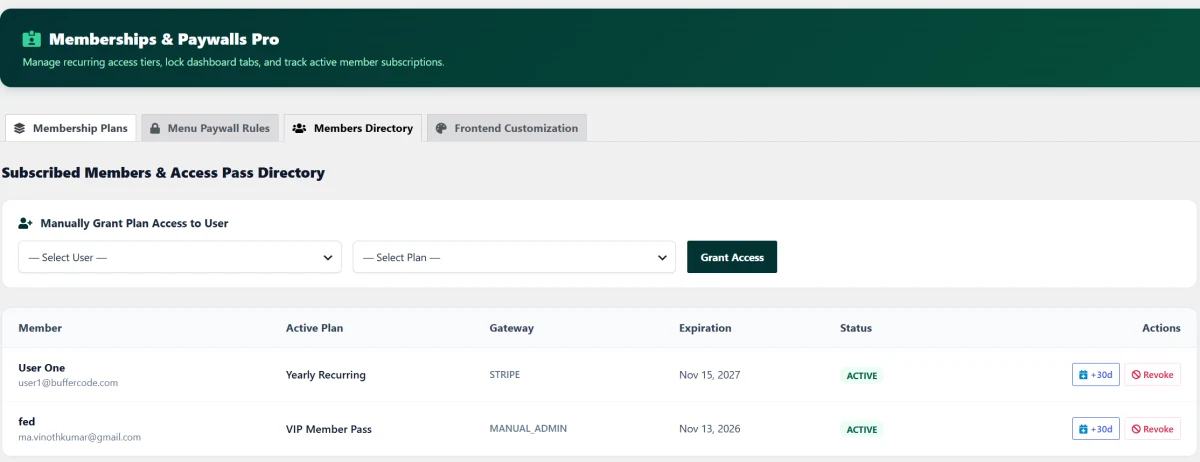
Take full command of your member base from a centralized administrative directory. Track payment gateways, monitor expiration dates, view real-time account statuses, and manually grant or adjust access passes for VIP clients, offline payments, or customer support scenarios.
- Instant Manual Access Granting: Manually enroll any registered WordPress user into any membership plan with a single click.
- One-Click
+30dExtensions: Grant immediate 30-day billing extensions to members directly from the table without opening payment gateway dashboards. - Instant Access Revocation: Immediately revoke access passes and downgrade privileges in real time.
- Multi-Gateway Attribution: Track where subscriptions originated, including Stripe, PayPal, GateFuz, or Manual Admin overrides.
- Live Status & Lifecycle Auditing: Monitor active, trial, expired, or canceled statuses with exact renewal timestamps.
Lock Specific Dashboard Tabs & Custom Post Types Behind Paid Tiers
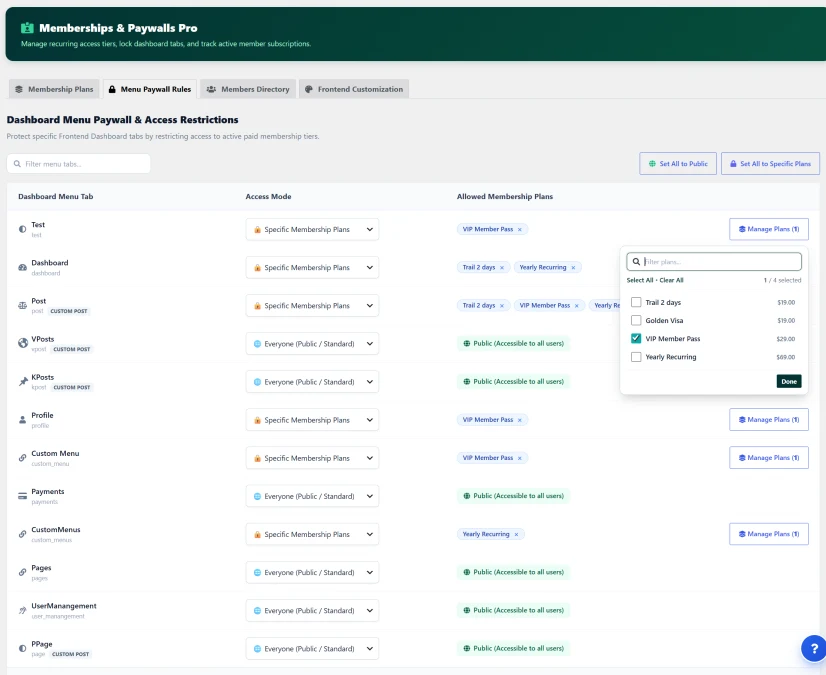
Turn any tab within Frontend Dashboard into a premium feature. With the Menu Paywall Rules engine, you can control precisely which user tiers have access to individual navigation menus, custom post publishing forms, or account tabs. When an unauthorized member clicks a locked tab, they are greeted with an elegant upgrade prompt that guides them to subscribe.
- Per-Tab Access Modes: Easily switch any menu tab between Everyone (Public / Standard) or Specific Membership Plans.
- Interactive Plan Selector: Assign single or multiple allowed plans per menu using an interactive search-and-select popover.
- Custom Post & Tool Protection: Protect standard menus (Dashboard, Profile, Settings) as well as dynamic Custom Post tabs (e.g.,
Post,VPosts,KPosts,PPage). - 1-Click Bulk Paywall Actions: Instantly execute bulk rules across your whole menu tree with dedicated "Set All to Public" and "Set All to Specific Plans" controls.
- Native Custom Menu Support: Protect custom frontend menu links created via the Frontend Dashboard Menu Builder.
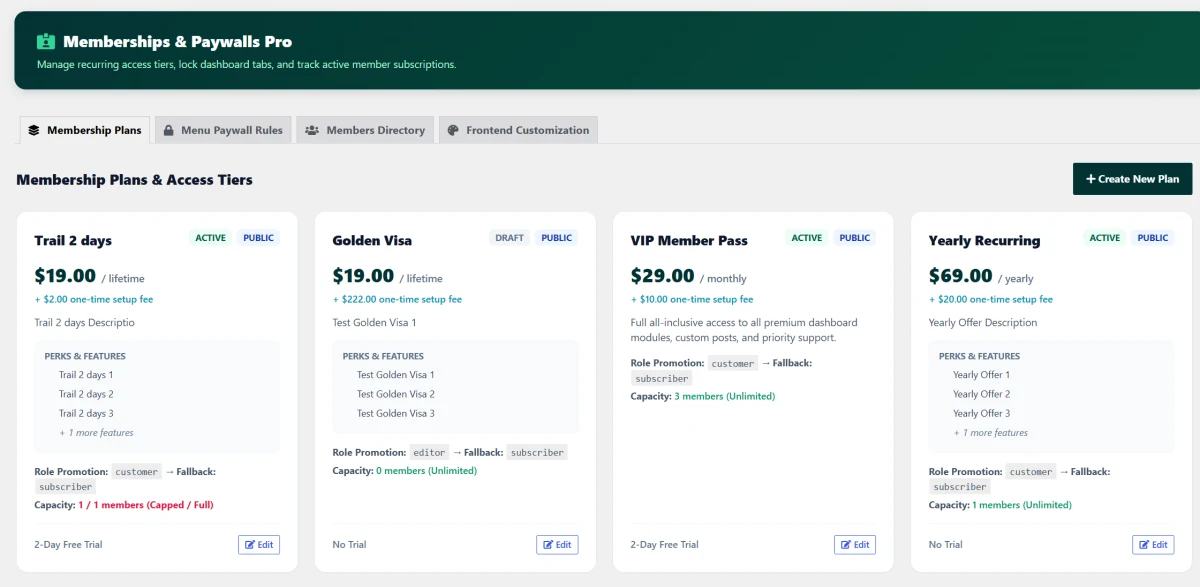
Design High-Converting Pricing Plans with Flexible Billing Schedules
Create unlimited membership tiers tailored to your monetization strategy. Whether you want to offer an introductory free trial, charge a one-time onboarding fee, or run monthly and annual recurring subscriptions, the intuitive Plan Builder handles your entire pricing structure with automated role synchronization.
- Flexible Billing Cycles: Sell access on Monthly, Yearly, Lifetime (one-off), or Custom intervals.
- One-Time Setup Fees: Charge initiation or onboarding fees upfront alongside recurring subscriptions.
- Free Trial Support: Offer risk-free trial days (e.g., 2-day or 7-day trials) with automated billing activation after the trial concludes.
- Member Capacity Caps: Set maximum subscriber limits per tier (e.g., "1/1 Capped / Full" for VIP cohorts or unlimited open enrollment).
- Automated Role Promotion & Fallbacks: Upgrade users to dedicated WordPress roles (e.g.,
Customer,Editor,VIP) upon active subscription and automatically downgrade them to a fallback role (Subscriber) if canceled or expired. - Visibility Controls: Toggle tiers between Active / Draft and Public / Hidden (ideal for private VIP invites or grandfathered rates).
Release Notes & Version History
Transparent release cycle, continuous improvements, and detailed developer logs for Frontend Dashboard Membership.
Release Notes & Version History
Follow every update, improvement, and new release for Frontend Dashboard Membership Pro. View comprehensive release notes, upcoming roadmap features, and detailed developer logs on our dedicated changelog hub.
Real-Time Releases
Instant updates, hotfixes & continuous delivery.
Developer Notes
Inspect migration guides, hooks & API changes.
Roadmap Sync
Transparent milestones and upcoming features.
Frequently Asked Questions & Knowledge Base
We host a comprehensive, searchable documentation portal with tutorials, troubleshooting guides, and answers to all common questions for Frontend Dashboard Membership.
Instant Search
Search through categorized articles, setup guides, and FAQs.
Guides & Code
Copy-paste PHP snippets, block usage, and shortcode examples.
Direct Support
Get detailed troubleshooting and step-by-step assistance.
License Checkout
Frontend Dashboard Membership